
|11 min read|Amara Winkler
WooCommerce Price Monitoring: Best Plugins and Free Methods in 2026
woocommerce price monitoringwoocommerce price monitoring pluginwoocommerce competitor price trackingprice tracking woocommercewoocommerce pricing strategymonitor competitor prices woocommerce

Source: Unsplash
Why WooCommerce Store Owners Need Price Monitoring
WooCommerce stores face unique pricing challenges:- Open marketplace: Unlike Amazon where prices are directly comparable, WooCommerce stores are independent. You need to actively seek out competitor prices.
- Platform diversity: Your competitors might be on Shopify, Amazon, Etsy, or their own WooCommerce stores. You need a solution that works across platforms.
- No built-in tools: WooCommerce doesn't include any competitor analysis or price tracking features. Everything needs to be added through plugins or external tools.
Store monthly revenue:           $10,000
Current profit margin (25%):      $2,500
After monitoring (+8.7% margin):  $3,370
Extra monthly profit:               $870
Annual impact:                   $10,440
Source: Unsplash
WooCommerce Plugin Feature Comparison
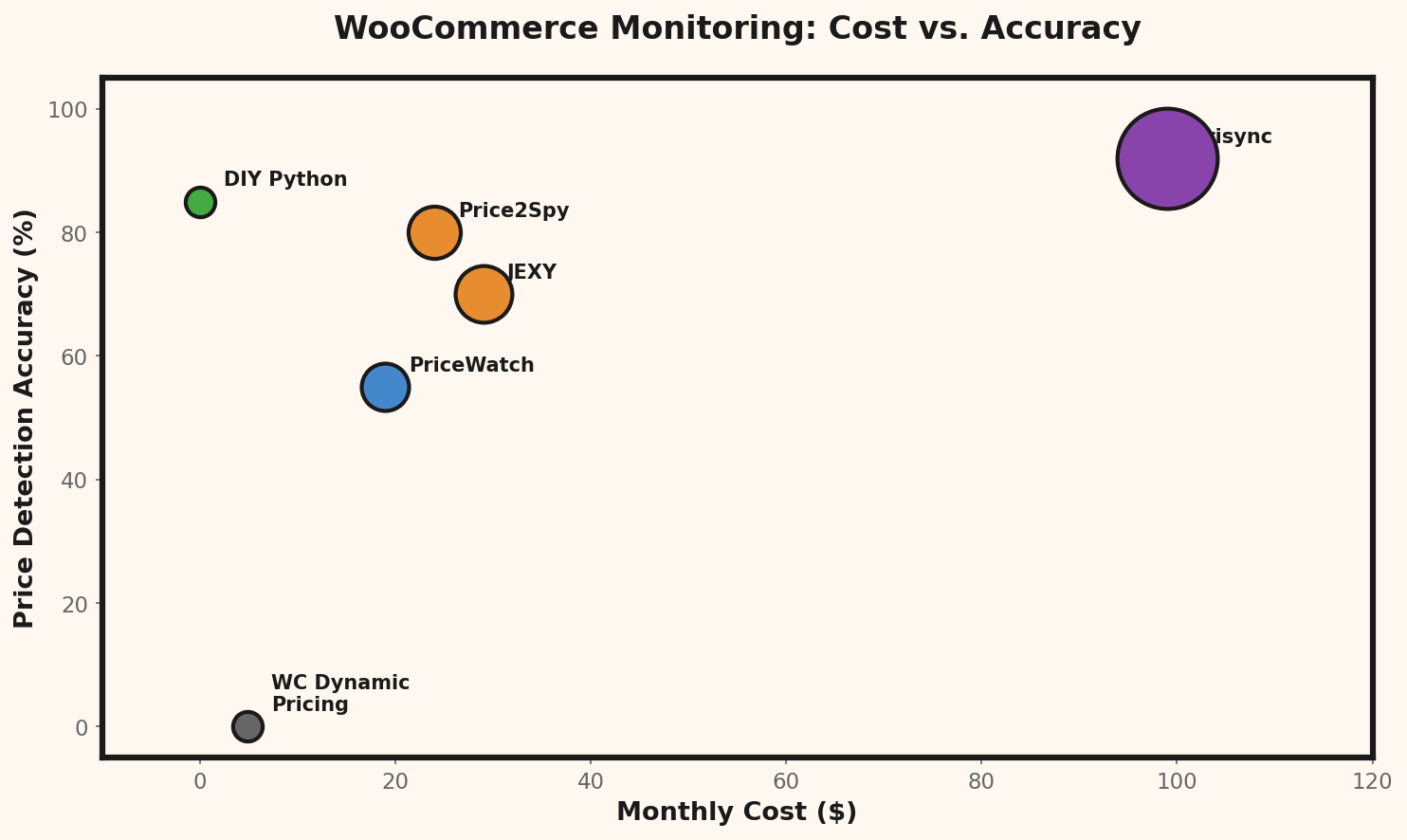
Before diving into individual tools, here is how the major options compare at a glance:| Feature | Dynamic Pricing | JEXY | PriceWatch | Prisync | Price2Spy | Undercut |
|---|---|---|---|---|---|---|
| Competitor price monitoring | No | Yes | Partial | Yes | Yes | Yes |
| WooCommerce integration | Native | Native | Native | API/CSV | API | External |
| JavaScript-rendered sites | N/A | Limited | No | Yes | Yes | Yes |
| Price history charts | No | Yes | No | Yes | Yes | Yes |
| Email alerts | No | Yes | No | Yes | Yes | Yes |
| Free tier available | No | No | Yes (25) | No | No | Yes (100) |
| Starting price/month | $5/mo | $29/mo | $0 | $99/mo | $23.95/mo | $0 |
Setup Complexity Comparison
| Method | Setup time | Technical skill | Ongoing maintenance | Reliability |
|---|---|---|---|---|
| WooCommerce plugin | 15-30 min | Low | Low | Medium |
| Prisync / Price2Spy | 1-2 hours | Medium | Low | High |
| Distill Web Monitor | 5 min/page | Low | Medium | Medium |
| Google Shopping alerts | 2 min/product | None | None | Low |
| Custom Python script | 4-8 hours | High | High | Medium |
| Undercut | 10 min | Low | None | High |
Option 1: WooCommerce Plugins for Price Monitoring
WooCommerce Dynamic Pricing & Discounts
Type: Rule-based pricing | Cost: $59/year This isn't a competitor monitoring plugin — it's a dynamic pricing engine. You set rules ("if product X is in category Y, apply Z% discount") and WooCommerce adjusts prices automatically. Best for: Implementing pricing rules after you've gathered competitive intelligence. Pros:- Native WooCommerce integration
- Bulk pricing rules across categories
- Time-based pricing (schedule sales automatically)
- Cart-based discounts
- Does NOT monitor competitor prices
- Rules are static — you still need to decide what to change
- Complex rule sets can conflict with each other
JEXY Price Monitoring for WooCommerce
Type: Competitor monitoring | Cost: From $29/month One of the few WooCommerce-native competitor monitoring solutions. JEXY scrapes competitor pages and displays price comparisons directly in your WooCommerce admin dashboard. Best for: WooCommerce store owners who want everything inside the WordPress admin. Pros:- Appears directly in WooCommerce product pages
- Automatic price detection from competitor URLs
- Price history charts
- Email alerts for price changes
- Limited to 100 products on the base plan
- Scraping accuracy varies — JavaScript-heavy sites may not work
- WordPress-dependent (adds server load)
- Smaller company, less frequent updates
PriceWatch for WooCommerce
Type: Price comparison | Cost: Free (limited) / $19/month PriceWatch connects your WooCommerce products with price comparison sites and shows how your prices rank against competitors. Best for: Stores that sell products also listed on Google Shopping or price comparison portals. Pros:- Google Shopping integration
- Automatic product matching via EAN/GTIN
- Competitive position indicator
- Free tier for up to 25 products
- Only works for products listed on comparison sites
- Doesn't cover competitors with niche or custom stores
- Matching relies on correct product identifiers
Option 2: External Price Monitoring Tools
These work independently of your WooCommerce installation and can monitor prices on any website.Prisync
Cost: From $99/month | WooCommerce integration: API/CSV import The industry standard for competitor price intelligence. Prisync monitors competitor pages, extracts prices, and provides analytics dashboards. For WooCommerce users:- Export your product catalog as CSV, import into Prisync
- Add competitor URLs per product
- View price positioning reports
- Set up email alerts
Price2Spy
Cost: From $23.95/month | WooCommerce integration: API Similar to Prisync but more affordable. Particularly good at handling complex website structures and JavaScript-rendered pages. For WooCommerce users:- API integration available for automatic product sync
- Supports multiple currencies
- Historical price data with trends
- Excel/CSV export for analysis
Keepa (Amazon only)
Cost: Free / $19/month | WooCommerce integration: None (manual) If your competitors are primarily on Amazon, Keepa's price history data is unbeatable. The free tier shows price graphs; the paid tier adds alerts and API access. For WooCommerce users:- Check Amazon prices for your products manually
- Set alerts for price drops on competing Amazon listings
- Use price history to time your own promotions
Option 3: Free DIY Methods
Method 1: Google Shopping Price Alerts
Google Shopping shows competitor prices for many products. You can:Method 2: RSS Feeds + Price Extractors
Some e-commerce platforms expose product data via RSS or sitemaps. Tools like Feedly can monitor these feeds for changes./feed/ or /products.atom)Method 3: Browser Extension Monitoring
Extensions like Visualping or Distill Web Monitor can watch specific page elements for changes.Method 4: Python Script (Technical Users)
For WooCommerce developers comfortable with code, a simple Python script can check prices daily:pythonimport requests
from bs4 import BeautifulSoup
import json
def get_price(url):
headers = {'User-Agent': 'Mozilla/5.0'}
response = requests.get(url, headers=headers, timeout=15)
soup = BeautifulSoup(response.text, 'html.parser')
# Try JSON-LD first (most reliable)
for script in soup.find_all('script', type='application/ld+json'):
try:
data = json.loads(script.string)
if data.get('@type') == 'Product':
offers = data.get('offers', {})
return offers.get('price') or offers.get('lowPrice')
except (json.JSONDecodeError, AttributeError):
continue
# Fallback: meta tags
og_price = soup.find('meta', property='product:price:amount')
if og_price:
return og_price.get('content')
return NoneMethod 5: WooCommerce REST API Price Check
If your competitors also run WooCommerce stores, you can query their public product data via the WooCommerce REST API:javascript// Check a competitor's WooCommerce product price via REST API
async function checkCompetitorPrice(storeUrl, productId) {
const endpoint = ${storeUrl}/wp-json/wc/v3/products/${productId};
const response = await fetch(endpoint);
const product = await response.json();
return {
name: product.name,
price: parseFloat(product.price),
regular_price: parseFloat(product.regular_price),
sale_price: product.sale_price ? parseFloat(product.sale_price) : null,
on_sale: product.on_sale,
last_checked: new Date().toISOString()
};
}
// Example usage
const competitor = await checkCompetitorPrice(
'https://competitor-store.com',
1234
);
console.log(${competitor.name}: $${competitor.price});Plugin approach (annual cost):
JEXY Price Monitoring: $29/mo x 12 = $348/yr
+ Setup time (0.5 hr x $50/hr): $25
Total first-year cost: $373
DIY Python scraper (annual cost):
Development (8 hrs x $50/hr): $400
Server/hosting (VPS): $5/mo x 12 = $60
Maintenance (2 hrs/mo x $50): $100/mo x 12 = $1,200
Total first-year cost: $1,660
Undercut (annual cost):
Free plan (100 products): $0
Setup time (10 min): $0
Total first-year cost: $0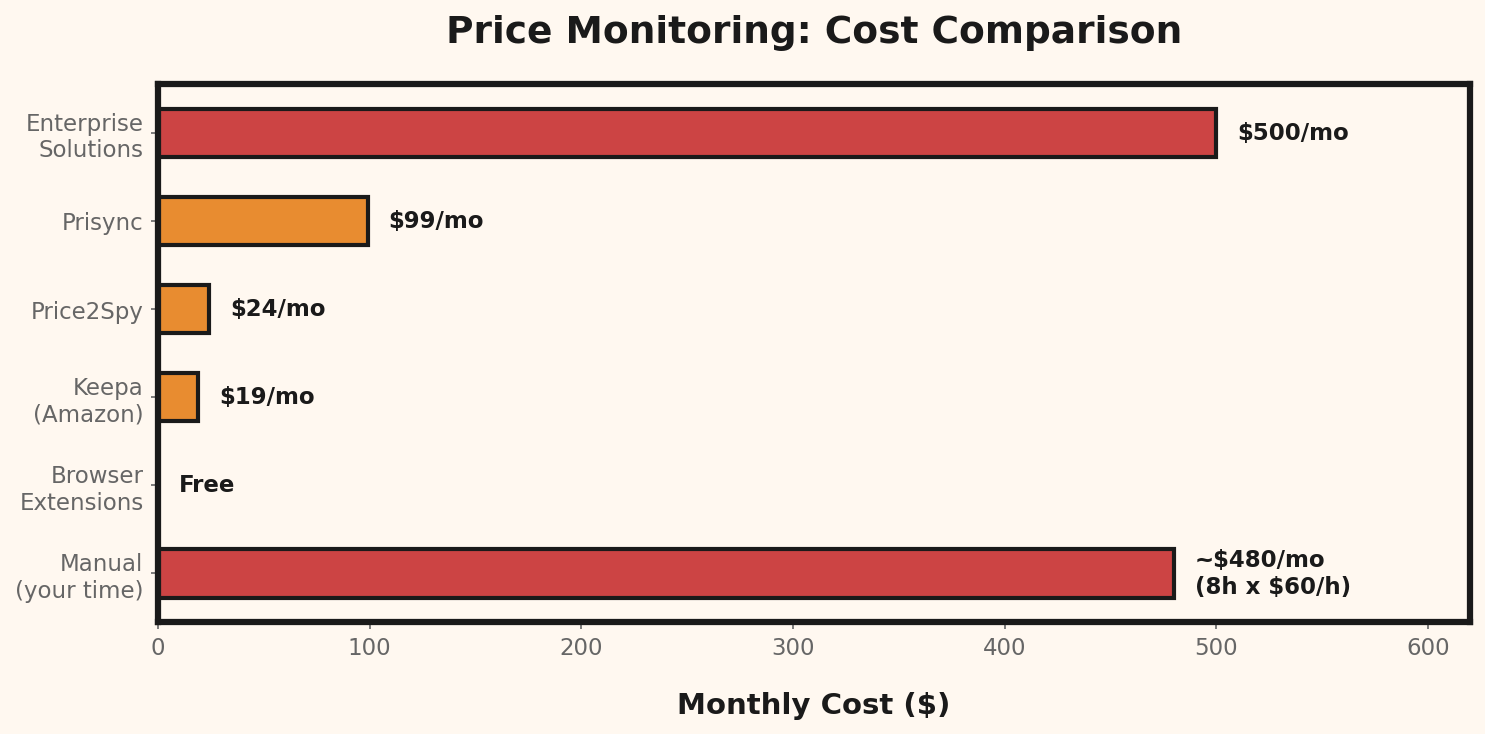
Which Method Is Right for Your Store?
Under 20 products, tight budget
Start with Google Shopping alerts + Distill Web Monitor for your top 5 competitors. Total cost: $0.20–100 products, growing store
Consider PriceWatch for WooCommerce (free tier) combined with Keepa if you compete with Amazon sellers. Total cost: $0–19/month.100+ products, established store
Invest in Price2Spy or Prisync. The time saved pays for itself. Total cost: $24–99/month.Technical team available
Build a custom Python scraper tailored to your specific competitors. It's the most powerful and flexible option, but requires ongoing maintenance.Setting Up Price Monitoring for Your WooCommerce Store: Step by Step
Step 1: Export Your Product Catalog
In WooCommerce, go to Products → All Products → Export. Export as CSV with these columns:- Product name
- SKU
- Price
- Product URL
Step 2: Identify Your Top 20 Products
Sort by revenue. Your top 20 products likely generate 80% of your sales. Start monitoring these.Step 3: Find Competitor URLs
For each of your top 20 products, find the equivalent product on 3–5 competitor sites. Google the product name or SKU to find them.Step 4: Set Up Monitoring
Using your chosen tool, add each competitor URL. Configure:- Check frequency: Daily is sufficient for most stores
- Alert threshold: Only notify on changes > 5% (filters out minor fluctuations)
- Email alerts: To you or your pricing team
Step 5: Create a Response Framework
Before you start getting alerts, decide how you'll respond:| Scenario | Response |
|---|---|
| Competitor drops 5–10% | Evaluate in 48 hours — might be a temporary sale |
| Competitor drops > 15% | Check immediately — is it a pricing error or strategy shift? |
| Competitor raises price | Consider following if your margin allows |
| Multiple competitors drop | Market shift — evaluate your entire category pricing |
