|10 min read|Joana Manjapane
Price Monitoring in Ecommerce: 7 Free Tools Compared
price monitoringcompetitor price trackingfree price monitoring toolsecommerce pricingprice comparison toolsprice tracking software

Source: Unsplash

Source: Unsplash
Why You Need to Monitor Competitor Prices
Before we dive into the tools, let's clarify why price monitoring is non-negotiable:- 94% of online shoppers compare prices before buying (source: Statista 2025).
- A 1% price change impacts profit by 11% on average (McKinsey).
- Ecommerce prices change multiple times per day — not once a week.
Current selling price:    $100.00
Product cost:              $60.00
Gross margin:              $40.00 (40%)

1% price drop → new price: $99.00
New gross margin:          $39.00 (39.4%)
Profit reduction:          -2.5% per unit

5% price drop → new price: $95.00
New gross margin:          $35.00 (36.8%)
Profit reduction: -12.5% per unitEvaluation Criteria
For this comparison, we evaluated each tool across five categories:| Criterion | Description |
|---|---|
| Coverage | Does it work with Shopify, WooCommerce, Amazon, and custom stores? |
| Accuracy | Does it detect the correct price without manual configuration? |
| Alerts | Does it send notifications when a price changes? |
| Free plan limits | How many products and competitors does it allow for free? |
| Ease of use | Can you get started in under 10 minutes? |
1. Google Alerts + Manual Spreadsheet
Cost: Free | Difficulty: Medium The most basic option: set up Google Alerts for your main products and track prices in a spreadsheet. It's not real automation, but it's where many sellers start. Pros:- Completely free
- No additional tools required
- Works for any product type
- Doesn't detect price changes directly
- Requires constant manual review
- Doesn't scale: beyond 20 products it becomes unmanageable
- No structured price history
2. Keepa (Amazon Only)
Cost: Free (basic) / from $19/month | Difficulty: Low If your competition is primarily on Amazon, Keepa is the go-to tool. It offers price history charts, drop alerts, and a very handy browser extension. Pros:- Complete price history for Amazon
- Browser extension with integrated chart
- Price alerts via email
- API available for automation
- Only works with Amazon — useless for Shopify, WooCommerce, or independent stores
- Free plan only shows limited data
- Doesn't compare your price against competitors on other platforms
3. Visualping
Cost: Free (5 pages) / from $13/month | Difficulty: Low Visualping monitors visual changes on any web page. It's not a dedicated pricing tool, but you can set it up to watch the price section of a product page. Pros:- Works with any web page
- Visual change detection (not just text)
- Free plan for 5 pages
- Email notifications
- Doesn't extract the price as a number — only detects that something changed
- Frequent false positives (banners, promotions, design changes)
- No structured price history
- Limited to 5 pages on the free plan
4. Price2Spy (Trial Plan)
Cost: 14 days free / from $23.95/month | Difficulty: Medium Price2Spy is a professional price intelligence tool with a generous trial period. It covers multiple platforms and offers detailed reports. Pros:- Broad platform coverage
- Professional reports with charts
- Historical price comparison
- Multi-currency support
- Free trial only lasts 14 days
- Cheapest plan is nearly $24/month
- Setup requires technical knowledge
- Geared toward mid-size and large businesses
5. Prisync
Cost: From $99/month (14-day free trial) | Difficulty: Low Prisync is one of the best-known price monitoring tools. It has an intuitive interface, strong accuracy, and solid support. Pros:- Very intuitive interface
- High accuracy in price detection
- Dashboard with clear overview
- Responsive support
- No real free plan — only a 14-day trial
- The $99/month base plan is prohibitive for small stores
- Focused on businesses with 100+ products
6. Browser Extensions (e.g. PriceSpy, Honey)
Cost: Free | Difficulty: Very low Extensions like Honey or PriceSpy are designed for consumers, but some sellers use them to spot-check prices. Pros:- Completely free
- Easy to install
- Price drop alerts
- Designed for buyers, not sellers
- No structured multi-competitor monitoring
- No data export or store integration
- Depend on the extension's database — don't cover small or niche stores
7. DIY Scraping Tools (Python + BeautifulSoup)
Cost: Free (requires technical skills) | Difficulty: High If you have programming skills, you can build your own scraper with Python. Libraries like BeautifulSoup, Scrapy, or Playwright let you extract prices from any website. Pros:- Completely free and customizable
- No product or competitor limits
- Full control over extraction logic
- Can integrate data directly with your system
- Requires Python and HTML knowledge
- Every store has a different structure — you need to keep selectors updated
- Stores with dynamic JavaScript (SPAs) need a headless browser
- No technical support — if something breaks, you fix it
- Potential legal issues depending on jurisdiction
Summary Comparison Table
| Tool | Price | Free Products | Multi-platform | Alerts | History |
|---|---|---|---|---|---|
| Google Alerts + Excel | Free | Unlimited | Yes (manual) | No | No |
| Keepa | Free/$19 | Unlimited (Amazon) | Amazon only | Yes | Yes |
| Visualping | Free/$13 | 5 | Yes | Yes | No |
| Price2Spy | $23.95/mo | 14-day trial | Yes | Yes | Yes |
| Prisync | $99/mo | 14-day trial | Yes | Yes | Yes |
| Extensions | Free | N/A | Partial | Yes | Partial |
| DIY Python | Free | Unlimited | Yes | Configurable | Configurable |
Free vs. Paid: 12-Month Cost Comparison
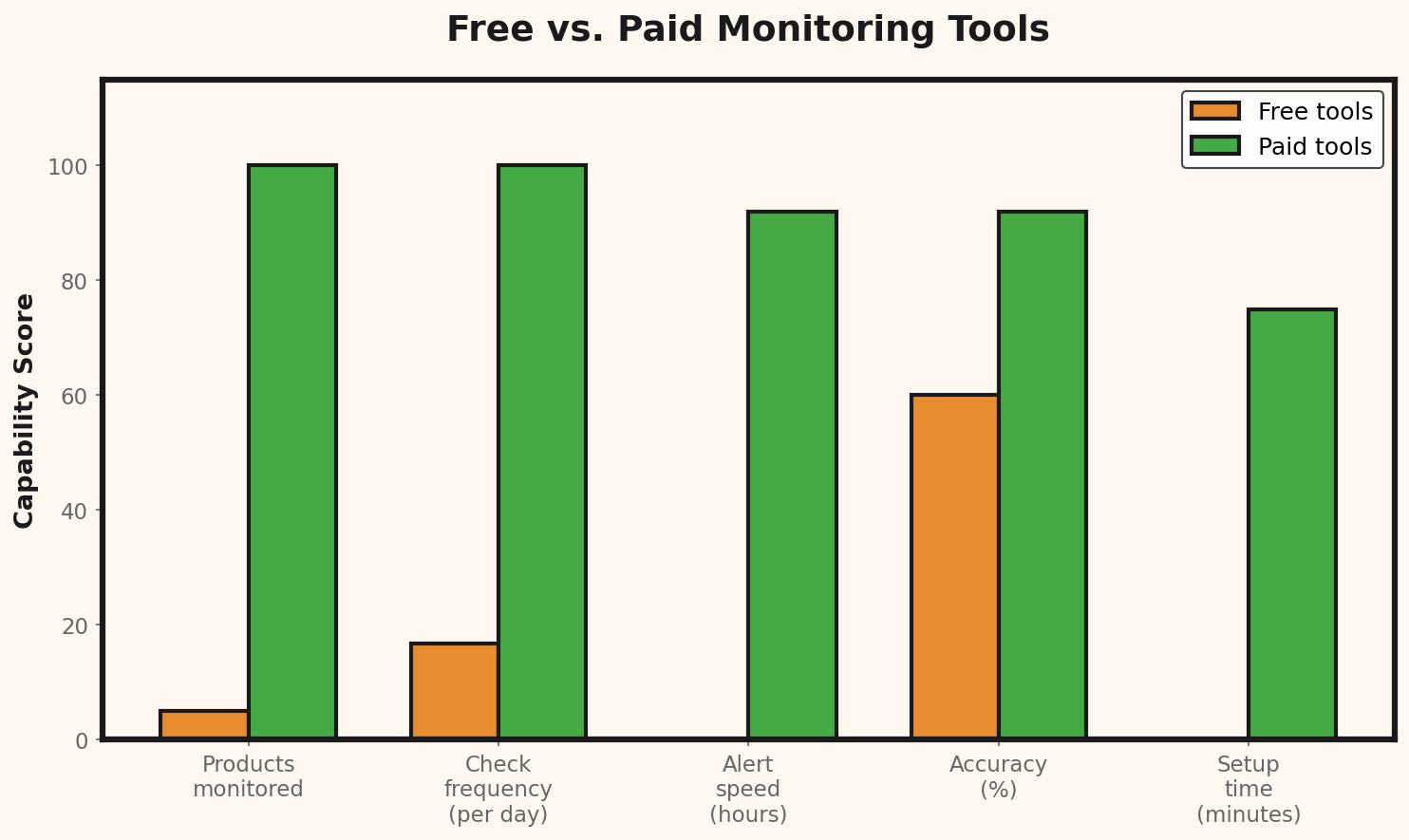
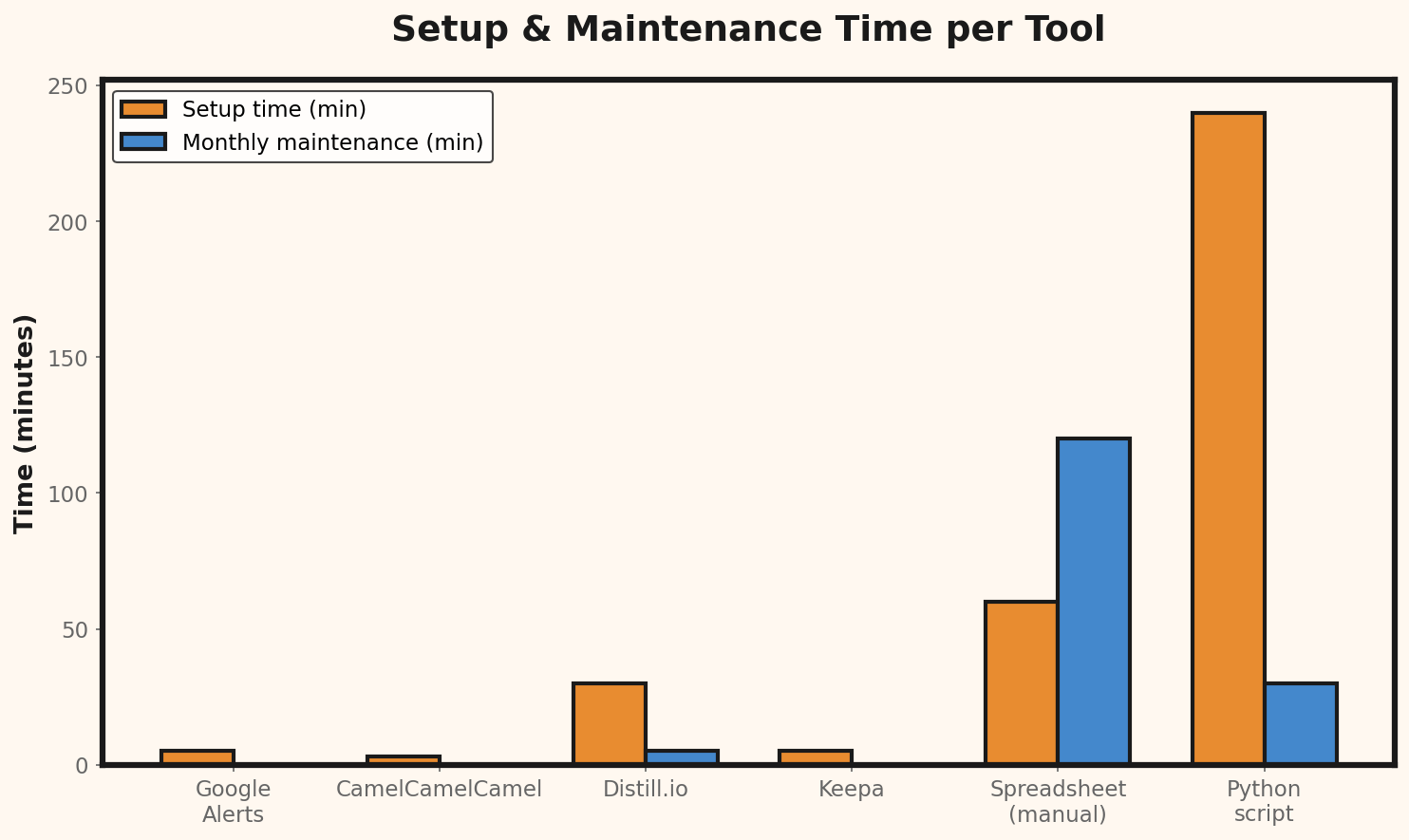
Before deciding, it helps to see the real cost over a year. Here is what each option actually costs — including the hidden expense of your own time:12-Month Cost Comparison (USD)
============================================================
Tool Subscription Maintenance Total/Year
(per year) (hours/year)
------------------------------------------------------------
Google Alerts + Excel $0 104 hrs × $30 $3,120
Keepa (paid plan) $228 12 hrs × $30 $588
Visualping (paid plan) $156 24 hrs × $30 $876
Price2Spy $287 12 hrs × $30 $647
Prisync $1,188 6 hrs × $30 $1,368
Browser Extensions $0 52 hrs × $30 $1,560
DIY Python Scraper $0 156 hrs × $30 $4,680
Undercut (free plan) $0 6 hrs × $30 $180
------------------------------------------------------------
Maintenance hours estimated based on average weekly upkeep
Hourly rate of $30 used as baseline for small business ownerFeature Value Scoring
To make an objective choice, you can assign a score to each feature that matters to you. Here is an example scoring framework:Feature Value Score (1-5 scale, 5 = best)
============================================================
Feature Weight Keepa Visualping Price2Spy Prisync Undercut
---------------------------------------------------------------------------
Multi-platform 25% 1 5 5 5 5
Automatic detection 20% 5 2 4 5 5
Price history 20% 5 1 5 5 4
Alert system 15% 4 3 4 4 5
Free plan limits 10% 3 2 1 1 5
Setup ease 10% 5 4 3 4 5
---------------------------------------------------------------------------
Weighted Score 3.35 2.80 3.95 4.10 4.85Detailed Use Case Recommendation Guide
| Your Situation | Best Option | Runner-Up | Why |
|---|---|---|---|
| Amazon-only seller | Keepa | Browser extensions | Deepest Amazon data available |
| Shopify store, < 10 competitors | Undercut (free) | Visualping | Auto-detection, no CSS config needed |
| WooCommerce, 10-50 competitors | Undercut (beta) | Price2Spy | Scales without enterprise pricing |
| Multi-channel, 50+ products | Prisync | Price2Spy | Professional reporting and dashboard |
| Technical founder, unlimited budget for time | DIY Python | Undercut (free) | Maximum customization |
| Just starting, testing the waters | Google Alerts + Excel | Undercut (free) | Zero commitment |
| Need hourly price checks | Undercut (beta) | Prisync | Hourly checks at a fraction of the cost |
| Dropshipping business | Undercut (free) | Keepa | Monitors suppliers across platforms |
Which Tool to Choose Based on Your Situation
You only sell on Amazon: Keepa is your best bet. No complications. You sell on Shopify or WooCommerce with few competitors (< 10): Start with Visualping for your most important pages and supplement with a spreadsheet. You have more than 50 products: You need a professional tool. Try Price2Spy or Prisync during their trial periods to evaluate whether the cost is justified. You have technical skills: A custom scraper will give you maximum flexibility with no recurring costs. You want something simple that works: Look for tools that offer automatic price detection without CSS selector configuration. The less manual setup you need, the less time you waste on maintenance.Common Mistakes When Choosing a Monitoring Tool
1. Choosing by Features Instead of Needs
You don't need 50 reporting features if you just want to know when a competitor drops a price. Start simple.2. Ignoring the Cost of Maintenance
A "free" tool that requires 2 hours of weekly maintenance is costing you money. Calculate your hourly cost and compare it against a paid solution.3. Monitoring Too Many Competitors
You don't need to watch everyone. 3–5 direct competitors is enough. More data doesn't always mean better decisions.4. Not Defining an Action Plan
Monitoring without strategy is just noise. Before turning on alerts, define: what do I do when a competitor drops by 5%? By 10%? By 20%?Example tiered response plan:
Competitor drop < 5% → Take no action. Monitor for 7 days.
Competitor drop 5–10% → Review margin. Consider adjusting only if margin allows.
Competitor drop > 10% → Analyze whether it's a temporary sale or permanent change.
If permanent: adjust price or emphasize value differentiation.
Competitor drop > 20% → Likely clearance. Don't follow. Hold your price.
