
|10 min read|Verena Merklinghaus
Shopify Pricing Strategy: How to Price Products for Maximum Profit
shopify pricing strategyhow to price products shopifyshopify competitor pricingshopify profit marginpricing strategy ecommerceshopify dynamic pricing

Source: Unsplash
The Pricing Foundations Every Shopify Store Needs
Know Your True Costs
Before any pricing strategy, you need accurate cost data. Most Shopify sellers undercount costs. Direct costs (per unit):- Product cost / COGS
- Shipping to your warehouse
- Packaging materials
- Shopify transaction fees (2.9% + $0.30 on Basic plan)
- Payment processing fees
- Returns and refunds (calculate your average return rate)
- Shopify subscription ($39–399/month)
- App subscriptions
- Marketing spend (divide by units sold)
- Storage / fulfillment costs
- Customer service time
Product cost:        $12.00
Shipping inbound:     $1.50
Packaging:            $0.80
Shopify fees (2.9%):  $0.87 (on a $30 sale)
Returns (8% rate):    $0.96

True cost per unit: $16.13The Three Pricing Floors
Every product needs three price points defined:
Source: Unsplash
Five Pricing Strategies for Shopify Stores
1. Cost-Plus Pricing
How it works: Add a fixed markup to your costs. Formula:Selling Price = Cost × (1 + Markup%)
Most Shopify sellers use 50–100% markup for physical products and 200–400% for digital products. You can quickly test different markup levels with our Markup Calculator.
When to use: When you're starting out and don't have competitive data yet. It's simple and guarantees a minimum margin.
The problem: It completely ignores what customers are willing to pay and what competitors charge. You might be leaving money on the table — or pricing yourself out of the market.
Here is a quick Shopify Liquid snippet to calculate and display markup on a product page:
liquid{% assign cost = 16.13 %}
{% assign selling_price = product.price | divided_by: 100.0 %}
{% assign markup = selling_price | minus: cost | divided_by: cost | times: 100.0 %}
<p>Your markup: {{ markup | round: 1 }}%</p>
<p>Profit per unit: ${{ selling_price | minus: cost | round: 2 }}</p>
2. Competitive Pricing
How it works: Set your prices relative to competitors. Three positions:- Price leader: 5–15% below the market average. Wins on volume, requires low costs.
- Price matcher: Within 3% of the market average. Competes on other factors (shipping, service, brand).
- Premium pricing: 10–30% above average. Requires clear differentiation.
3. Psychological Pricing
How it works: Use pricing techniques that influence perception. Charm pricing: $29.99 instead of $30. Sounds obvious, but it still works. Studies show charm pricing increases sales by 8–24%. Anchor pricing: Show the "original" price crossed out next to the sale price. Shopify supports this natively with the "Compare at price" field. Bundle pricing: "Buy 2 for $45" (vs. $25 each). The discount is $5, but the perceived value is much higher. The customer feels smart, you increase average order value. Price ending in 7: $27, $47, $97. Studies suggest these "non-round" endings perform well for mid-range products because they feel calculated rather than arbitrary. When to use: Always. These aren't standalone strategies — they're tactics that work alongside any pricing approach.4. Value-Based Pricing
How it works: Price based on the value your product delivers, not what it costs you. Example: A handmade leather wallet costs $8 to make. Cost-plus pricing at 100% markup = $16. But customers shopping for handmade leather goods expect to pay $40–80. Pricing at $16 actually hurts sales because it signals "cheap." Value-based pricing means understanding:- What alternatives exist and what they cost
- What makes your product different (and is the customer willing to pay for that difference?)
- What price communicates the right quality level
5. Dynamic Pricing
How it works: Adjust prices based on real-time market conditions. On Shopify, you can implement dynamic pricing through:- Shopify Scripts (Plus plan): Automated discounts based on cart contents, customer tags, etc.
- Apps like Bold Commerce or Prisync: Adjust prices based on competitor data or demand signals
- Manual adjustments: Weekly price reviews based on competitor monitoring data
- Never change more than 10% at a time (larger changes alarm customers)
- Change prices no more than weekly (too frequent = lost trust)
- Always maintain your price floor
- Document every change and its rationale
How to Analyze Your Competitors' Pricing on Shopify
Step 1: Identify Real Competitors
Not every store in your niche is a competitor. Focus on stores that:- Sell similar products at a similar quality level
- Target the same customer segment
- Appear in the same search results and ads
- Have a similar shipping range
Step 2: Gather Pricing Data
For each competitor, record:- Product price (before and after discounts)
- Shipping cost (or free shipping threshold)
- Bundle offers
- Loyalty/subscription discounts
- How often they run sales
Step 3: Calculate Total Customer Cost
The sticker price doesn't tell the whole story. Calculate the total cost to the customer:Product price: $35.00
Shipping: $5.99
Tax (avg. 8%): $3.28
Total: $44.27Step 4: Map Your Position
Plot your brand and competitors on a price-quality map to find gaps and opportunities: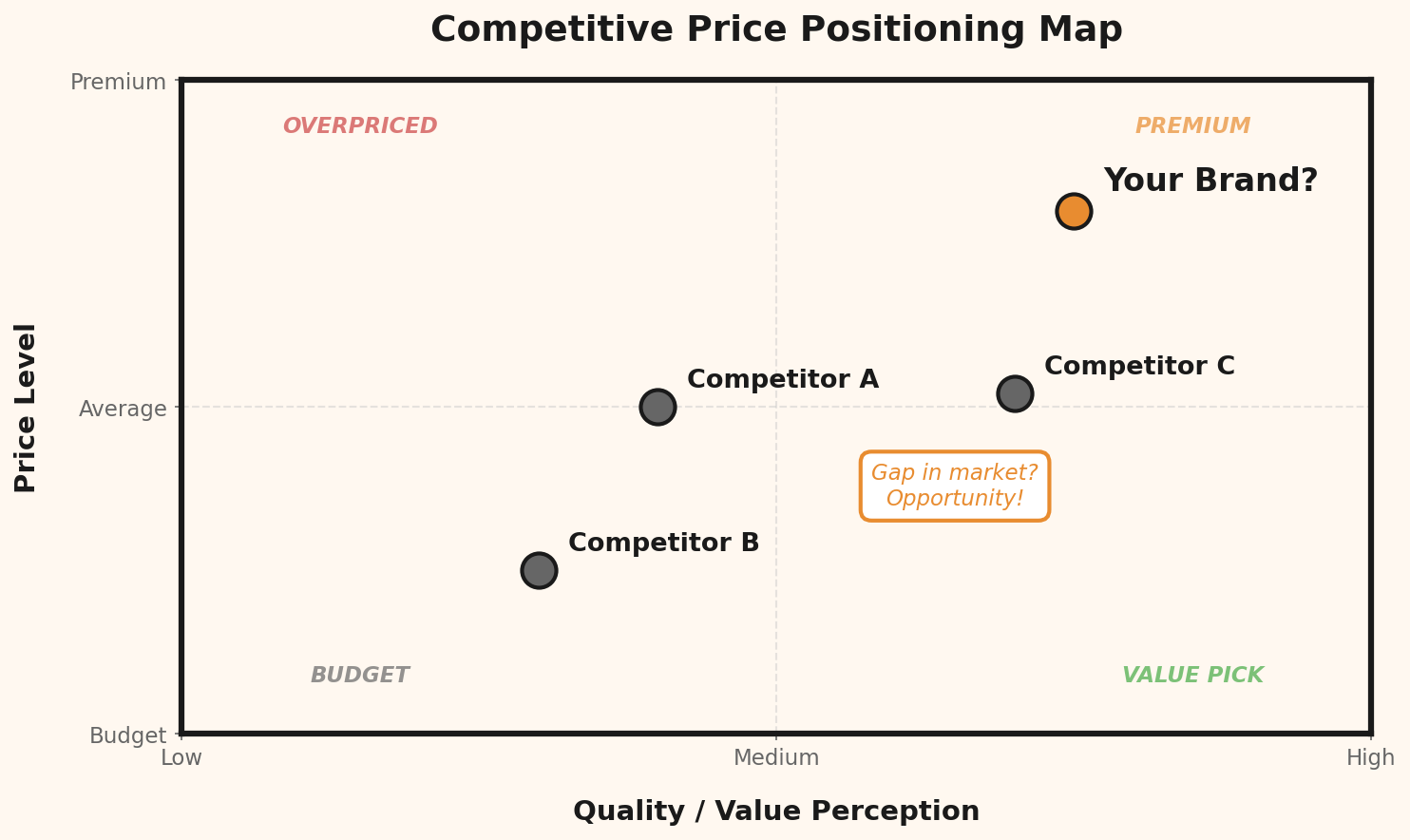
Shopify-Specific Pricing Tips
Use "Compare at Price" Strategically
Shopify's built-in "Compare at price" shows a crossed-out original price. Use it, but honestly:- The "original" price should be a real price you charged, not an inflated number
- In many jurisdictions, fake original prices are illegal
- A 15–25% discount looks credible. A 70% discount looks suspicious.
Optimize for Free Shipping Threshold
Free shipping thresholds drive higher average order values. Analyze your current AOV and set the threshold 20–30% above it. If your AOV is $35, set free shipping at $45. Many customers will add an extra item to qualify.Price in the Customer's Currency
Use Shopify Markets or a currency conversion app to show prices in the visitor's local currency. A price of "$29.99" means something different to a US customer than a European one seeing "€27.49."Test Prices with A/B Testing
Shopify apps like Intelligems or Elevate allow price A/B testing. Show different prices to different customer segments and measure conversion rates. Important: Price A/B testing is ethically and legally complex. Always test modestly (within 10–15%) and never show different prices to identifiable individuals.Use Tiered Pricing for Volume
WooCommerce handles this natively, but on Shopify you'll need an app. Tiered pricing ("Buy 1 for $25, 3 for $60, 5 for $90") works exceptionally well for consumable products.Shopify Pricing App Comparison
| App | Price/Month | Auto-Repricing | Competitor Tracking | Free Trial |
|---|---|---|---|---|
| Prisync | $99 | Yes | Up to 100 URLs | 14 days |
| Competera | $249 | Yes | Unlimited | Demo only |
| Price2Spy | $59 | No | Up to 50 URLs | 30 days |
| Intelligems | $74 | A/B testing | No | 15 days |
| Undercut | Free tier | Alerts only | Up to 40 URLs | Always free |
Pricing Strategy Pros & Cons
| Strategy | Pros | Cons | Best For |
|---|---|---|---|
| Cost-Plus | Simple, guarantees margin | Ignores market & demand | Beginners, commodity products |
| Competitive | Market-aware, data-driven | Requires constant monitoring | Crowded markets |
| Psychological | Easy to implement, proven results | Minor effect in isolation | All products (as a tactic) |
| Value-Based | Maximum profit potential | Hard to quantify value | Unique/handmade products |
| Dynamic | Responsive to market changes | Can erode customer trust | High-volume, seasonal items |
When to Raise Prices
Most Shopify store owners are afraid to raise prices. But there are clear signals that you should:- Your conversion rate is above industry average (>3% for most niches): You might be too cheap.
- You're frequently out of stock: Demand exceeds supply. Raise prices until equilibrium.
- Competitors are priced 20%+ above you without obvious quality differences.
- Your margins are shrinking due to rising costs.
- You're attracting too many bargain hunters who return products or leave bad reviews.
When to Lower Prices
Price reductions should be strategic, not reactive:- Clearing slow-moving inventory: Use Shopify's automatic discount codes with expiry dates
- Entering a new market: Introductory pricing to build reviews and ranking
- Competing with a new aggressive competitor: But only after verifying their prices are sustainable
- Seasonal adjustments: Lower prices during predictable slow periods
Example: Is a 10% price cut worth it?
Current price:              $40.00
Current daily sales:        15 units
Daily revenue:              $600.00
True cost per unit:         $22.00
Daily profit:               $270.00

After 10% price cut:        $36.00
Expected sales increase:    +20% → 18 units
Daily revenue:              $648.00
True cost (18 units):       $396.00
Daily profit:               $252.00

Result: -$18/day profit (-6.7%)
You need +28% more sales just to break even.
