
|10 min read|Verena Merklinghaus
Shopify Price Monitoring: How to Automatically Track Competitor Prices
shopify price monitoringecommerce price trackingcompetitor price tracking shopifyshopify competitor pricesonline price monitoringprice comparison shopifyshopify pricing tools

Source: Unsplash
Why Price Monitoring Is Critical for Shopify Stores
Your Customers Compare Prices — Even If You Don't See It
94% of online shoppers compare prices before making a purchase. Google Shopping, PriceGrabber, price comparison sites — the tools are right at their fingertips. If you don't know how you stack up on price, you're losing customers without even knowing it.Small Price Differences Have a Massive Impact
McKinsey research shows that a 1% price change affects profit by an average of 11%. With 500 orders per month and a $5 difference per product, that's $2,500 per month — in one direction or the other.Example: Impact of a price change on monthly profit
Number of orders: 500 / month
Price difference: +$5 per product
Additional revenue: 500 × $5 = $2,500 / month
Additional annual revenue: $2,500 × 12 = $30,000
→ One informed price adjustment = $30,000 more per yearShopify Has No Built-In Price Monitoring
Unlike Amazon, which shows competitor prices in the Buy Box, Shopify doesn't offer any built-in tools for tracking competitor prices. You have to set everything up yourself.Method 1: Free Monitoring with Browser Extensions
Distill Web Monitor
A free extension for Chrome and Firefox. It lets you monitor changes on any webpage. How to set it up:- Completely free for small stores
- Works with any website
- Email and push notifications
- Easy setup
- Manual setup required for each page
- Can break when a competitor redesigns their site
- Doesn't extract price as a number — only notifies of changes
- 25 pages isn't enough for larger stores
Visualping
A similar tool, but it monitors visual changes (not just text). Free plan: 5 pages, checks every 12 hours. Best for: Monitoring pages that frequently change their layout — Visualping will detect a change even if the HTML element has changed.Method 2: Google Shopping and Price Comparison Sites
Google Shopping Alerts
If your products (and your competitors' products) are listed on Google Shopping:PriceGrabber / Shopzilla (US market)
If you sell in the US, price comparison sites give you a free window into competitor pricing. PriceGrabber shows all sellers of a given product with real-time prices. How to use it:Method 3: Shopify Apps for Price Monitoring
Prisync
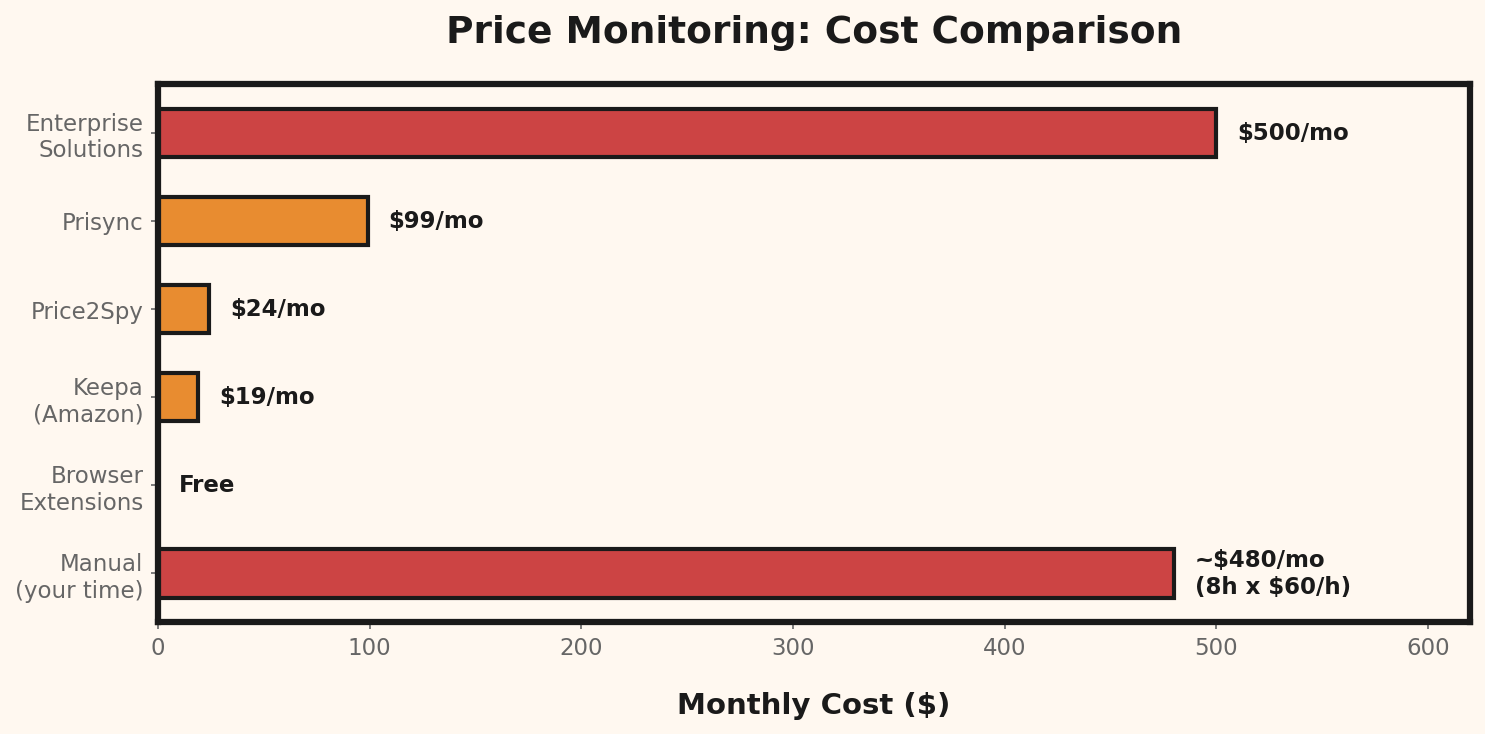
Cost: From $99/mo | Shopify integration: Yes Prisync is a professional price monitoring tool with a dedicated Shopify app. It automatically syncs your product catalog and monitors competitor prices. How it works with Shopify:- Professional dashboard with charts
- Automatic catalog sync
- High accuracy in price extraction
- Reports and data export
- $99/mo is a significant expense for a small store
- Oriented toward stores with 100+ products
Competera
Cost: On request (enterprise) | Shopify integration: API Competera is an enterprise tool with AI algorithms for price optimization. Definitely too expensive for small stores, but worth knowing about — because your larger competitors may be using it.Intelligence Node (Coreai)
Cost: From $50/mo | Shopify integration: API/CSV A more affordable alternative to Prisync with good coverage of European markets.Method 4: Build Your Own Script (For the Technical)
If you have basic programming knowledge, you can build your own price monitor. Here's a simplified outline: What you need:- Python 3 + libraries (requests, beautifulsoup4)
- Hosting for the script (e.g., free cron on GitHub Actions)
- A Google Sheet or database to store results
- Completely free
- No product/competitor limits
- Full control over the logic
- Can integrate with the Shopify API
- Requires programming knowledge
- Maintenance: the script breaks when a competitor changes their site
- JavaScript-heavy pages need a headless browser (Playwright/Puppeteer)
- Legal risk in some jurisdictions
Shopify Monitoring ROI: Is It Worth the Investment?
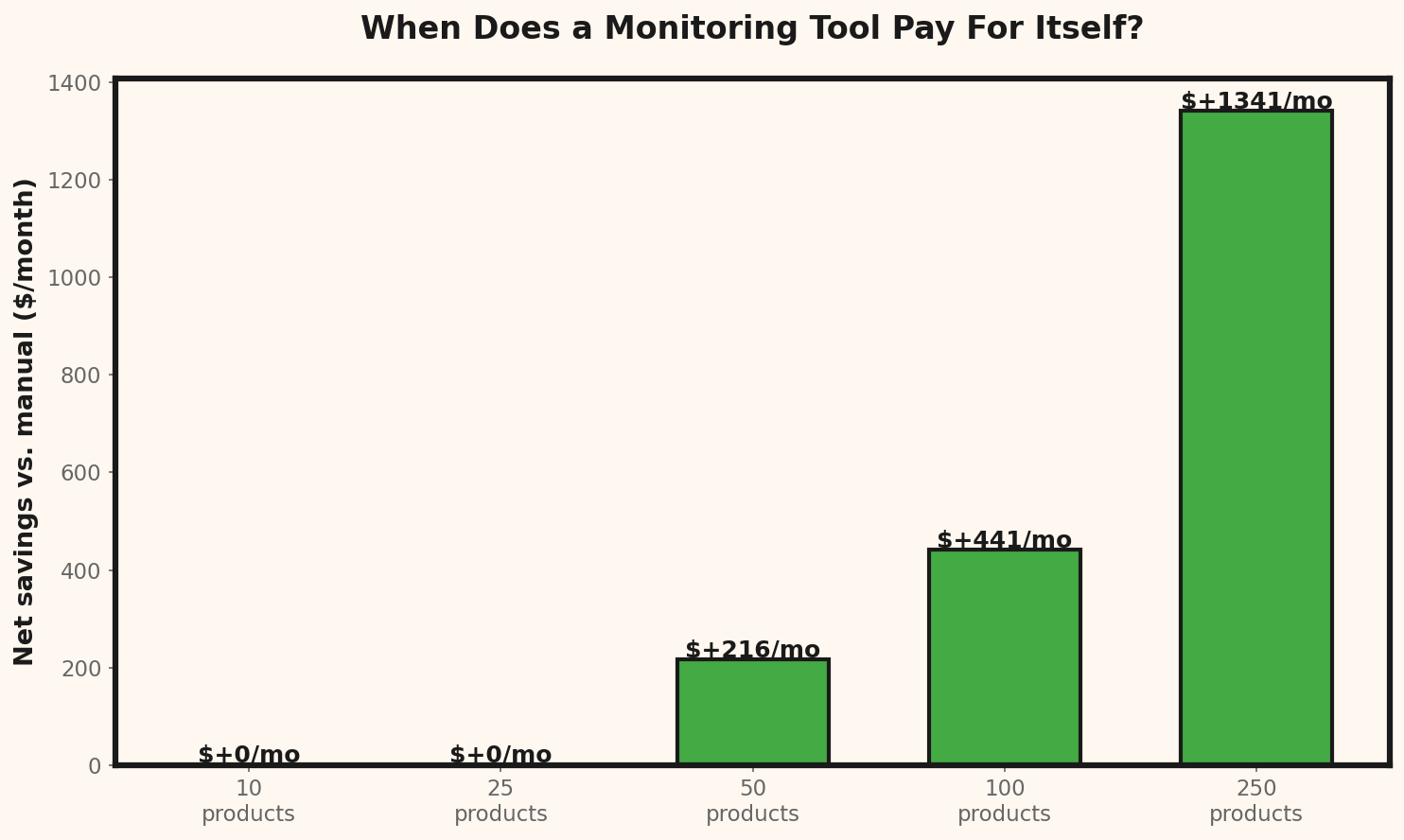
Before choosing a tool, calculate whether price monitoring will pay for itself. Here's a simple ROI framework:Shopify Monitoring ROI Calculation
──────────────────────────────────────────────
Inputs:
Monthly orders: 500
Average order value: $75
Estimated price optimization: 2% (conservative)
Monitoring tool cost: $50/month
Monthly benefit:
500 orders × $75 × 2% = $750/month
Monthly cost:
Tool subscription: $50/month
Net monthly gain: $700/month
Annual ROI: ($700 × 12) / ($50 × 12) = 1,400%
→ Even a modest 2% price optimization pays for itself 14x over.
Source: Unsplash
Alert Threshold Configuration
When setting up monitoring, configure your alert thresholds to avoid notification overload:Alert threshold configuration example
──────────────────────────────────────────────
Product category: Electronics
Minor change (< 3%): Log only, no alert
Moderate change (3-10%): Daily digest email
Major change (> 10%): Instant email alert
Price error (> 30%): Instant alert + flag for review
Product category: Fashion / Seasonal
Minor change (< 5%): Log only, no alert
Moderate change (5-15%): Daily digest email
Major change (> 15%): Instant email alert
Stock clearance (> 40%): Instant alert + do NOT matchMonitoring App Comparison
| Feature | Distill (Free) | Prisync ($99/mo) | Intelligence Node ($50/mo) | Undercut (Free tier) |
|---|---|---|---|---|
| Max products | 25 pages | Unlimited | Unlimited | 100 products |
| Check frequency | 6 hours | 4x daily | 2x daily | 2x daily |
| Price extraction | No (change detection) | Yes (numeric) | Yes (numeric) | Yes (numeric) |
| Shopify integration | No | Yes (native app) | API/CSV | API |
| Alert types | Email, push | Email, dashboard | Email, CSV | |
| Price history | No | Yes (charts) | Yes | Yes |
| Multi-currency | N/A | Yes | Yes | Yes (30+ currencies) |
Monitoring Frequency Recommendations
Not all products need the same monitoring schedule. Match frequency to volatility:| Product type | Recommended frequency | Reason |
|---|---|---|
| Electronics / gadgets | Every 4-6 hours | High price volatility, frequent promotions |
| Fashion / apparel | 1x daily | Seasonal changes, less frequent price shifts |
| Home & garden | 1x daily | Stable pricing, rare sudden changes |
| Supplements / health | 2x daily | Competitor promotions common |
| Seasonal goods | Every 4 hours (in season) | Rapid price changes during peak demand |
| Luxury / premium | 1x weekly | Price stability, brand-driven pricing |
How to Organize Price Monitoring — Step by Step
Step 1: Choose Your 20 Most Important Products
Don't monitor everything. Start with the products that generate 80% of your revenue. In Shopify: Shopify Admin → Analytics → Products → sort by revenue → take the top 20.Step 2: Identify Your Competitors
For each of the 20 products, find 3–5 direct competitors. Where to look:- Google Shopping: search by product name
- PriceGrabber / comparison sites: search by UPC
- Amazon: search by product name
- Direct competitors: stores you see in the same Google results
Step 3: Record Baseline Prices
Create a spreadsheet:| Product | Your price | Competitor A | Competitor B | Competitor C | Market average |
|---|---|---|---|---|---|
| Product X | $99 | $89 | $105 | $95 | $96 |
Step 4: Set Up Monitoring
Choose the method that fits your budget and scale:| Store size | Recommended method | Monthly cost |
|---|---|---|
| < 20 products | Distill + Google Shopping | $0 |
| 20–100 products | Distill + PriceGrabber + spreadsheet | $0 |
| 100+ products | Prisync or Intelligence Node | $50–$100 |
| Technical owner | Custom script | $0 |
Step 5: Establish Pricing Rules
Before you start receiving alerts, decide how you'll respond:- Competitor drops by 5–10%: Watch for 48 hours — it might be a temporary promotion
- Competitor drops by > 15%: Check immediately — pricing error or strategy?
- Competitor raises price: Consider following suit (higher margins)
- Multiple competitors drop at once: Market shift — analyze the entire category
Common Mistakes in Shopify Price Monitoring
Mistake 1: Reacting to Every Price Change
Not every competitor price drop requires a response. Flash sales, clearance events, pricing errors — that's noise, not signal.Mistake 2: Ignoring Shipping Costs
The product price isn't the full picture. A competitor with a $89 price and $15 shipping is more expensive than you at $99 with free shipping.Total cost comparison for the customer:
Competitor: $89 + $15 (shipping) = $104 total
Your store: $99 + $0 (free shipping) = $99 total
→ Your store is $5 cheaper despite the higher product price
