
|6 min read|Amara Winkler
Amazon Price Tracking: How Sellers Monitor Competitor Prices in 2026
amazon price trackingamazon competitor priceskeepa alternativebuy box optimizationamazon repricingprice monitoring amazon

Source: Unsplash
Why Amazon Price Tracking Matters More Than Ever
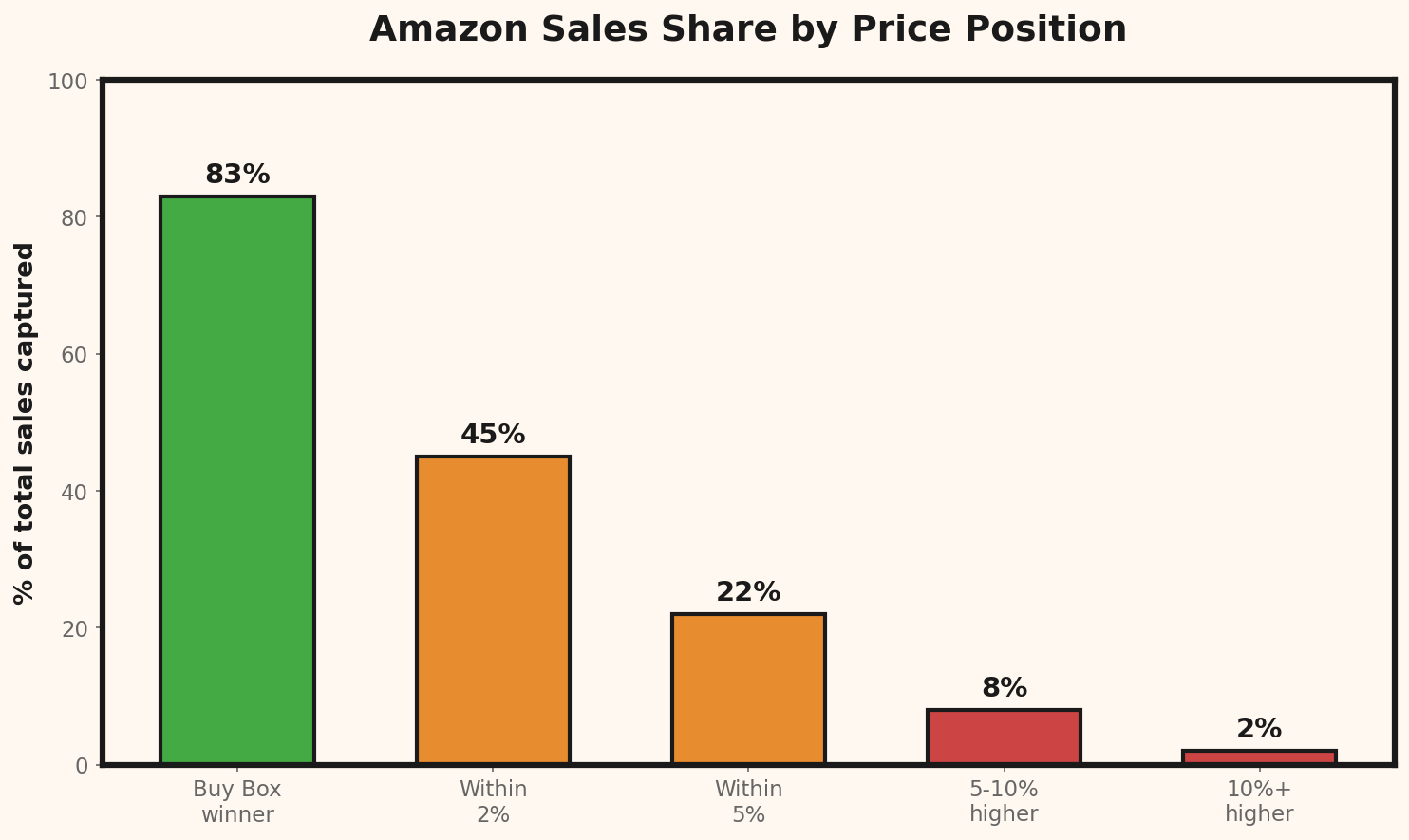
Amazon has over 2.5 million active sellers. In any given product category, you might compete with dozens of sellers offering identical or nearly identical products. The Buy Box — which captures roughly 83% of all Amazon sales — is heavily influenced by price. Here's the uncomfortable truth: your competitors are already tracking your prices. If you're not tracking theirs, you're the one flying blind.The Free Options: Keepa and CamelCamelCamel
Keepa
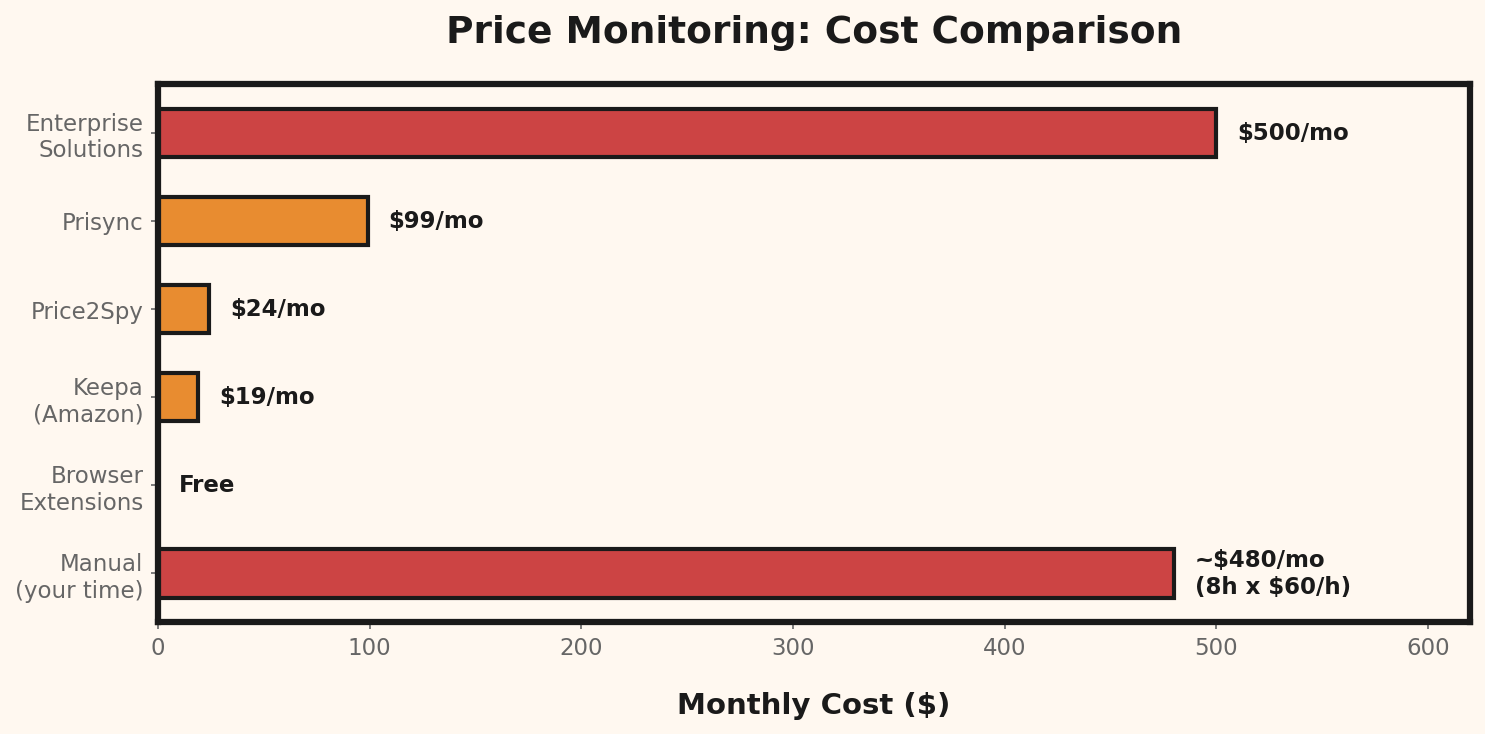
Keepa is the gold standard for Amazon price history. The free tier shows basic price graphs; the paid plan ($19/month) adds:- Real-time price alerts
- API access for automation
- International price tracking across Amazon marketplaces
- Deal notifications

Source: Unsplash
CamelCamelCamel
Completely free, CamelCamelCamel tracks Amazon price history and sends email alerts when prices drop below your target. It's simpler than Keepa but effective for basic monitoring. Best for: Casual sellers or buyers who want free price drop alerts.The Limitation of Both
Neither Keepa nor CamelCamelCamel tracks prices outside of Amazon. If your competitors also sell on their own Shopify store, on eBay, or through wholesale channels, you need a broader solution.Automated Repricing Tools
For high-volume sellers, manual price tracking isn't practical. Automated repricers adjust your prices in real-time based on competitor activity.Popular Amazon Repricers
| Tool | Starting Price | Key Feature |
|---|---|---|
| RepricerExpress | $55/month | Rule-based + AI repricing |
| Informed.co | $99/month | Game theory algorithms |
| BQool | $25/month | Budget-friendly, solid UI |
| Seller Snap | $250/month | Pure AI-driven repricing |
When to Use a Repricer vs. Manual Tracking
Use a repricer when:- You sell 100+ SKUs on Amazon
- You're in highly competitive categories (electronics, commodity goods)
- Buy Box share is your primary metric
- You sell unique or private-label products with few direct competitors
- Your margins are high enough that small price fluctuations don't matter
- You're testing a new market and want to understand pricing dynamics first
The Real Cost of Losing the Buy Box
Let's put some numbers on why price monitoring matters:Your current price: $24.99
Competitor undercuts to: $23.49
Buy Box share drops: 83% → 30%
Monthly units (with Box): 200
Monthly units (without): 72
Revenue lost per month: $3,198
Cost of a price monitoring tool: $25-99/monthBuilding Your Amazon Price Monitoring Strategy

Source: Unsplash
Step 1: Identify Your Price-Sensitive Products
Not all products need constant monitoring. Focus on:- Top 20% by revenue — where price changes hit hardest
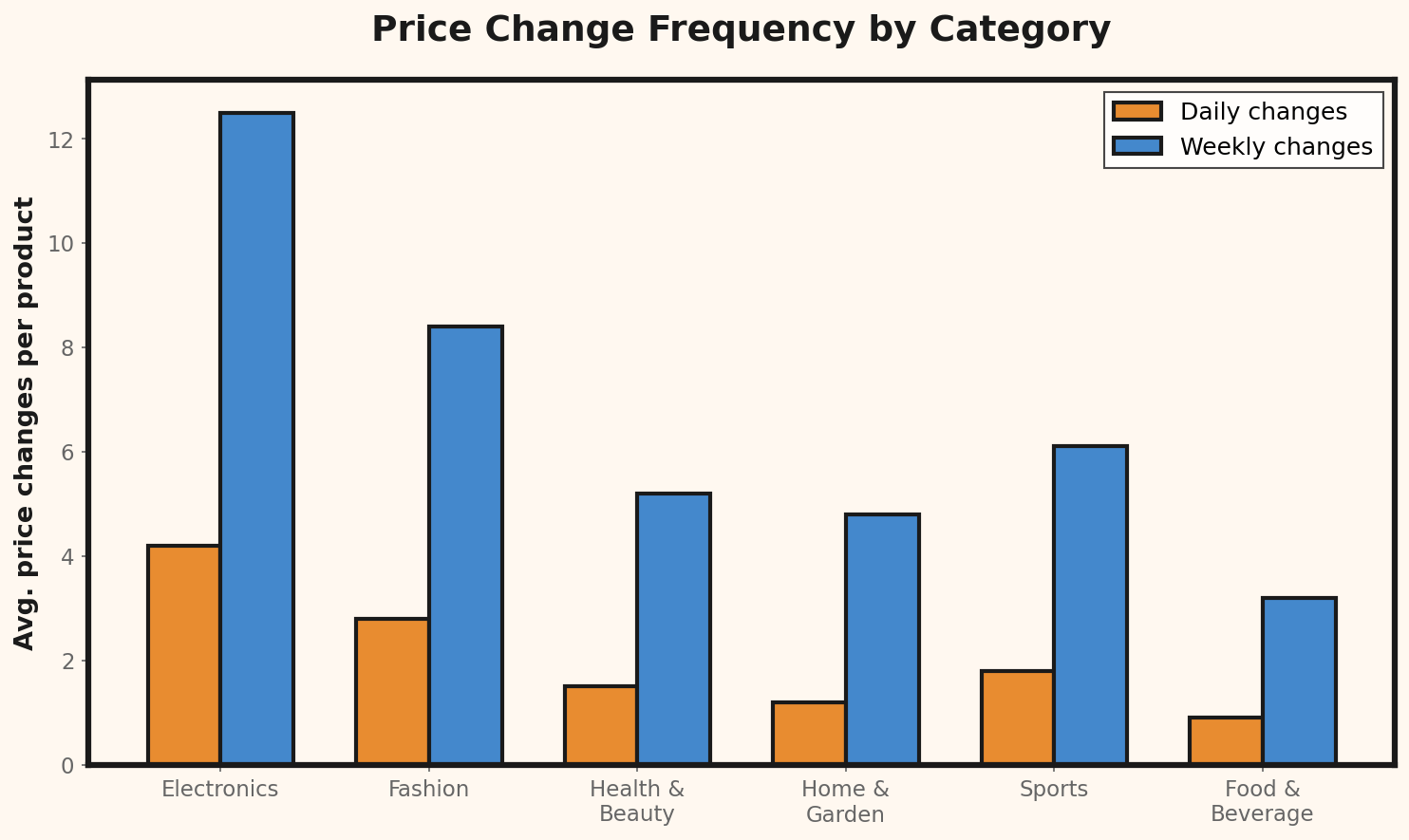
- Products with 5+ direct competitors — high competition = frequent price changes
- Buy Box-competitive ASINs — where you're rotating with other sellers
Step 2: Set Up Alerts, Not Just Tracking
Passive tracking (logging prices daily) is useful for trends. But active alerts are what prevent you from losing the Buy Box overnight. Configure alerts for:- Price drops > 5% from any competitor
- New sellers entering your ASIN
- Price increases (opportunity to raise your own)
Step 3: Define Your Response Rules
Before alerts start coming in, decide:- Minimum margin: Never go below this, even if competitors do
- Response time: How quickly will you evaluate a price change? (24h is typical)
- Escalation criteria: At what point do you stop following a competitor down?
Example minimum margin calculation:
Product cost:              $12.00
Amazon referral fee (15%):  $3.75 (on $25 sale)
FBA fee:                    $5.40
Shipping to FBA:            $1.20
Returns (4%):               $1.00

Break-even price:          $23.35
Minimum margin (15%):       $3.50
Floor price: $26.85Step 4: Track Beyond Amazon
Your smartest competitors check prices across platforms. A product might be cheaper on your competitor's own website but more expensive on Amazon — or vice versa. Use a cross-platform monitoring approach to get the full picture.FBA vs. FBM: Cost Comparison for Price Strategy
Understanding the cost difference between FBA (Fulfilled by Amazon) and FBM (Fulfilled by Merchant) is critical for setting competitive floor prices. Here's a side-by-side comparison for a typical $25 product:| Cost Factor | FBA | FBM |
|---|---|---|
| Storage fees (monthly) | $0.87 | $0.00 |
| Fulfillment fee | $5.40 | $0.00 |
| Shipping cost | $0.00 (included) | $4.50 |
| Packaging materials | $0.00 (included) | $0.75 |
| Labor per order | $0.00 | $2.00 |
| Returns processing | $2.12 | $3.50 |
| Total per unit | $8.39 | $10.75 |
| Buy Box eligibility | High | Lower |
Buy Box Win Rate Impact on Annual Revenue:

Scenario A: 80% Buy Box win rate
  Monthly units sold:     200
  Average price:          $24.99
  Monthly revenue:        $4,998
  Annual revenue:         $59,976

Scenario B: 40% Buy Box win rate (after competitor undercut)
  Monthly units sold:     96
  Average price:          $24.99
  Monthly revenue:        $2,399
  Annual revenue:         $28,790

Revenue difference:       $31,186/year
Cost of monitoring tool:  $300-1,188/year
ROI on monitoring:        2,525% - 10,295%
